Payment Sources
When you receive a payment from your payors (such as Aetna, BCBS, etc.) the Accounting application allows you to apply this payment to the patients in the system associated with this payor. But often, the same payor may have multiple entries in the ChiroTouch system. This occurs when the payor is entered into the system multiple times with varying details such as the spelling of the payor name or varying addresses, etc. The "Payment Sources" utility allows you to consolidate payors with multiple addresses or names in the system. Consolidating these payors under one umbrella payment source allows you to easily group all Aetna payors in the system from which to apply the payment.
NOTE:
Before consolidating all of your payors through the "Payment Sources" utility, consider that you may have many payors in your system that you no longer receive payments from. Therefore, we suggest that you begin by establishing payment sources for all of your most common payors (Aetna, BCBS, etc.)
Creating Your Payment Sources
Click on "Payment Sources" in the maintenance portion of the Accounting screen to associate multiple payor entities with a single payment source. This screen allows you add, edit, merge, and delete your payment sources.
 To add a new payment source, click the "New" button.
 Enter a name for your payment source in the "Name" field.
 Click the "Add" button to add a payment source. Note that you must add at least one payor address to create a payment source.
 Select one or more payors from the list and click the "Select" button.
 Click the "Save" button.
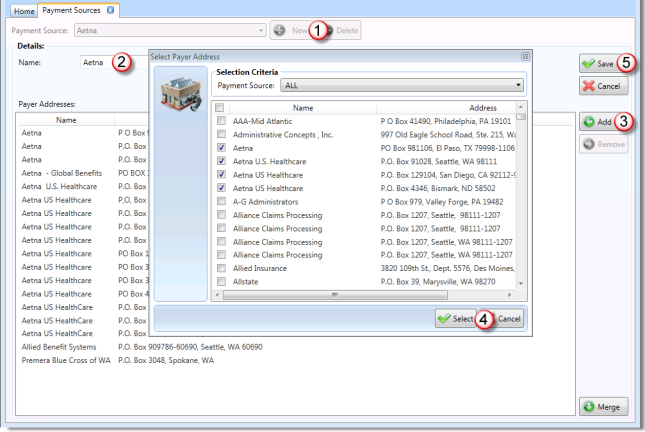
Use the "Add" and "Remove" buttons on this screen to add and remove payors from this list of payors associated with this payment source.
Merging Payment Sources
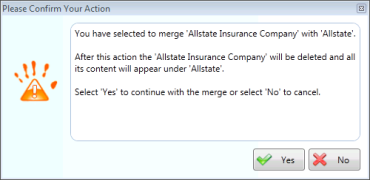
In the rare instance that you need to merge two payment sources (and all associated payors), select the payment source in this screen which you would like to keep and click the "Merge" button. Select a payment source from the list which you would like to merge with the initial payment source. Then click the "Save" button to save your changes. Keep in mind that merging payment sources cannot be undone.