Exploring the ChiroTouch Start-Up Screen
When opening the legacy version of ChiroTouch (not opening the launcher) the main ChiroTouch start-up screen appears. This main ChiroTouch program represents the backbone of the ChiroTouch software group. From this start-up screen, you can log into the Front Desk, Provider, and Maintenance applications. These applications manage front desk operations, provider procedures, and system maintenance.
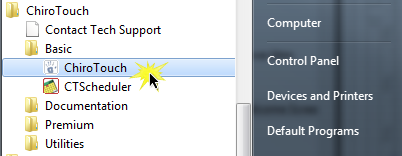
To open the Front Desk, Maintenance, or Maintenance application, click the corresponding button at the bottom of your ChiroTouch welcome screen. But first, let’s further explore the aspects of this window.
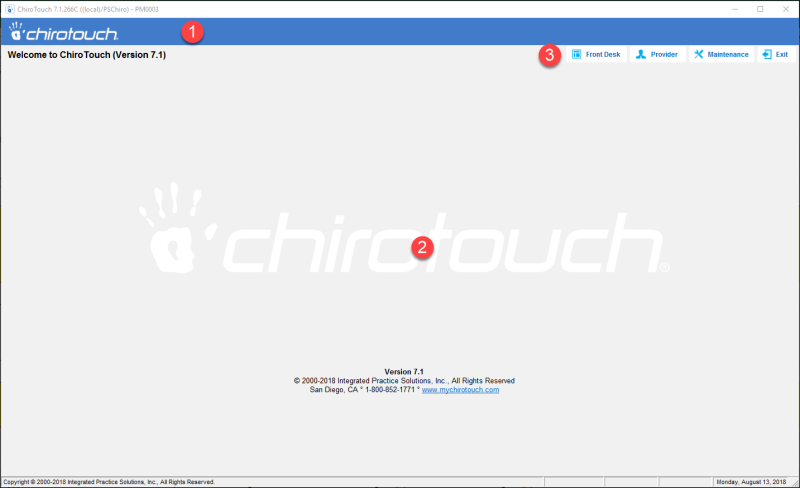
 Information Bar – When logged into the Front Desk or Maintenance applications, this information bar provides information pertaining to the current task and/or patient.
 Start-Up Screen/Work Area – The start-up screen appears when you first launch ChiroTouch. When accessing the Front Desk, Maintenance, and Maintenance applications, this screen functions as the work area, and displays the various interfaces based on which task is being performed.
 Navigation – This navigation bar displays various buttons depending on which application you are currently working in. You can use these buttons to navigate through the ChiroTouch applications, set up various features, check missed alerts and messages, or log out of the application.