Office Structure
Depending on the structure of your office and your daily patient flow, the Patient Sign-In applications may be used in various locations throughout the office. Here we explore two examples of an office layout that may provide a useful demonstration when setting up the system in your own office.
First, decide on the following before setting up the applications:
- Is your office structured to allow for patient self check-in?
- Where do you want the patients to check in?
- What sign-in methods are available in your office?
- How many treatment rooms are in your office, and are these rooms shared by other associates?
Answering these questions prepares you to set up the applications successfully and in accordance with your practice standards.
CT Sign-In

In both of the examples described in this chapter, the CT Sign-In is located in the Front Desk area. Placing the Sign-In computer close to the front desk allows you to monitor its use. You can even place the computer at the front desk. The Sign-In computer can be placed wherever you want your patients to sign in and where space permits.
CT Provider 
The CT Provider application may be used in every treatment room and thus be configured specifically for that location and for certain providers. For instance, if an associate only provides services in the Massage room, the CT Provider application may be configured for that room and set up to display only massage appointments. The application may be configured for one or more associates, and these settings may be adjusted at any time according to practice schedules.
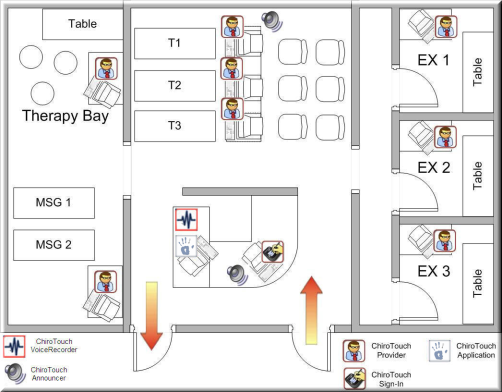
Office Layout - Multiple Exam Rooms
CT Announcer

Because the CT Announcer broadcasts greetings and directions to the patient, the speakers assigned to the CT Announcer are generally placed within a reasonable distance from the patient waiting area and the CT Sign-In computer.
CT Voice Recorder

As the CT Voice Recorder is managed by doctors and office staff only, it should be placed in a location that allows for private and uninterrupted recordings.
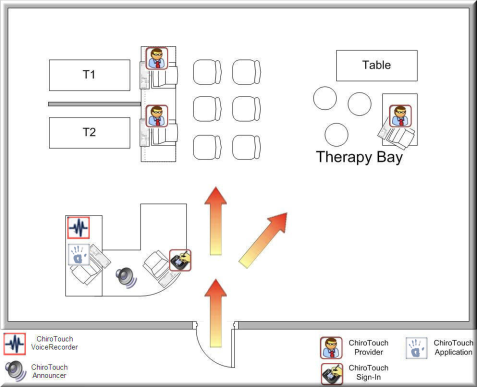
Office Layout - Few Exam Rooms
The ChiroTouch icon represents the applications contained in ChiroTouch, including Front Desk, Maintenance, Provider, and the CT Scheduler application. Use these applications to handle all billing, scheduling, and check out procedures.
All applications in ChiroTouch Premium have their own desktop icon that will launch each program separately. As the programs works independently from each other, you can open and work on multiple applications at a time.