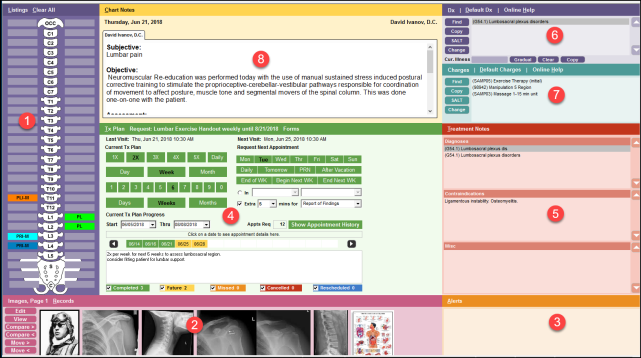
Overview of All-In-One Screen
The main screen of Provider All-In-One comprises eight sections, each associated with a separate task in documentation of your patient’s appointment. Each section is distinguished by a different color so they can be easily identified. Various pop-up dialog boxes give you setup options and allow you to make detailed selections. The All-In-One screen helps you to move through your documentation in steps while being able to see the entire scope of the patient’s file onscreen. The sections are easy to manage and designed to help you complete your documentation quickly and accurately.
This chapter will discuss each of the following sections of the CT Provider All-In-One screen:
- Listings
- Images/Records
- Alerts
- Treatment Plan
- Treatment Notes
- Diagnoses
- Charges
- Chart Notes