EDI Transactions
ChiroTouch has gone through preliminary 5010 testing with the following vendors. We have been approved as a vendor by the following trading partners in the following areas. At this time, we cannot guarantee the compatibility of ChiroTouch with vendors not on this list.
| Trading Partner | Vendor Approved? | 837 Transactions | 835 Transactions |
|---|---|---|---|
| Availity | Approved | YES | |
| BCBS of MI | Approved | YES | |
| HNS (NC) | YES | ||
| Infinedi | YES | YES | |
| Ingenix / Optum | Approved | YES | YES |
| Office Ally | Approved | YES | YES |
| Trizetto (formerly Gateway) | Approved | YES | YES |
| Waystar | Approved | YES | YES |
Enabling EDI
To set up your EDI transactions, you must first enable EDI in the system.
- To enable EDI, open the ChiroTouch Accounting application.
- Click the Setup tab.
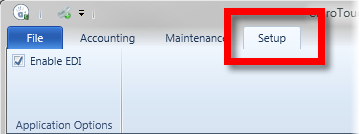
- Click the Enable EDI box in the Accounting ribbon.