Meaningful Use FAQ
 When I try to register patients for the patient portal or send an e-copy of health info to the patient portal, I get an error message saying it is not possible. How can I fix this?
This results from an issue with your email settings. To resolve the issue:
- Log in to ChiroTouch with provider credentials.
- Open the ChiroTouch Launcher.
- Right-click the Launcher icon.
- Select Options.
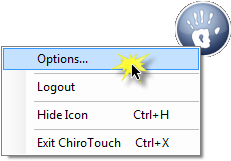
- The software will open the Options window. Click the MU Settings button.
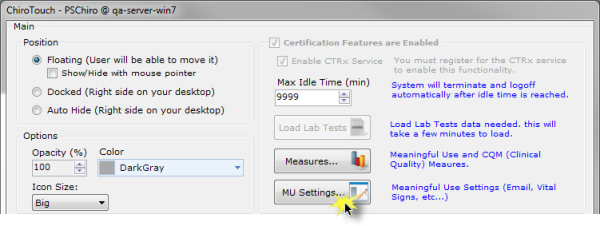
- The software will open the MU Settings window.
- Select MyChiroTouch Configurable from the Email Type: drop-down menu.
- Enter your practice's primary email address in the Return Email: field.
- In the Port: field, enter a value of 0 and click Save.

If you continue to receive an error message, follow steps 1-5 above, enter a value of 587 in the Port: field and click Save.
If this still does not work, follow steps 1-5 above and enter a value of 465 in the Port: field and click Save. 
I get an SSO-207 error when I try to launch CTRx. What should I do?
Email the ChiroTouch EHR Department. We'll need to connect to your server to resolve the issue. Let us know a few dates and times that you are available for us to assist you.
I get an SSO-209 error when I try to launch CTRx. What should I do?
This error often results from incorrect Clock, Language and Region settings on either your workstation computer or server computer. Verify that both computers are set to your correct date, time zone and correct time. To check this:
- Open each computer's Control Panel from the Start button. Click Clock, Language and Region settings.
- Under Date and Time, click Set the time and date.
- Your operating system will open the Date and Time dialog box displaying the date, time and time zone.
- Check that the date, time zone and time information is correct.
NOTE:
If you need help determining the exact time in your area, visit http://www.timeanddate.com/worldclock/ and search for your city.
If both computers are set to the correct date, time, and time zone and you are still getting the SSO-209 error, create a case with the Meaningful Use Department. Let us know a few dates and times that you are available for us to assist you.
I get an SSO-210 error when I try to launch CTRx. What should I do?
Please create a case with the Meaningful Use Department and include the following information:
- Whether the error is occurring for all patients or just one patient
- The names of the patient or patients the error is occurring for
- Whether the error is occurring on all workstations
- A few dates and times that you are available for us to assist you
I get an SSO-302 error when I try to launch CTRx. What should I do?
This error results when a DrFirst account is inactive or disabled.
Please email the ChiroTouch EHR Department with the following information:
- Your Client ID
- The name of the provider who received the error
- The provider's ChiroTouch User Name (not their password)
I get an SSO-305 error when I try to launch CTRx. What should I do?
This error results from mismatched information between your ChiroTouch system and your DrFirst portal.
Please create a case with the Meaningful Use Department and include the following information:
- Your Client ID
- The name of the provider who received the error
- The provider's ChiroTouch User Name (not their password)
CTRx
I have decided that I do not want to participate in the EHR program. How do I cancel my CTRx subscription?
- Navigate a web browser to the MyChiroTouch.com Accounts page.
- Scroll through the list of services enabled on your account to CTRx.
- Click Cancel Service under the appropriate provider.
Can I get a refund on my CTRx subscription? I want to cancel my subscription and I no longer want to participate in the EHR Incentive Program.
Per your CTRx purchase agreement, there are no refunds after your credit card is charged for the CTRx service. You must submit a cancellation request via the MyChiroTouch.com Accounts page prior to the renewal date if you not want to renew your subscription..
NOTE:
Canceling the CTRx service for a provider will result in non-compliance for that provider's Meaningful Use reporting period.
Will my CTRx subscription automatically renew each year?
Your CTRx service will automatically renew annually. The renewal date is the same month and day as your initial billing date. You must submit a cancellation request via the MyChiroTouch.com Accounts page prior to the renewal date if you not want to renew your subscription. We will send you a reminder email during the month before your subscription renewal date.
Can every provider at my practice share the same CTRx subscription?
No. Each provider at your practice who is participating in the EHR Incentive Program must have a unique CTRx subscription.
Why do I need a CTRx subscription? After all, I'm a chiropractor who doesn't prescribe medication.
The basic CTRx service has nothing to do with prescribing medication.
As part of the Meaningful Use Program requirements set by CMS, each participating provider must have individual access to both an active medication and allergy list, and that information must be on the e-copy that you send to the patient portal for Patient Electronic Access – Timely Access. The basic CTRx subscription meets these requirements.
We do offer the full e-prescribing version of the CTRx service for doctors who do prescribe medication. Again, the CTRx subscription is designed to meet a CMS requirement for the Meaningful Use Program.
Payments and Penalties
How much of a penalty will apply if I choose not to participate in EHR?
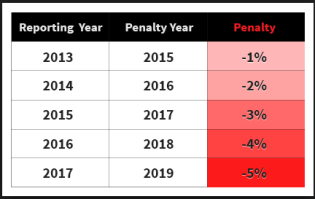
The CMS payment adjustment for not participating is 1% each year starting January 1, 2015. The penalty is cumulative every year that you do not demonstrate meaningful use of your CEHRT software, and the penalty caps at 5% in 2019.
What’s the most incentive money I can receive by successfully completing a reporting period?
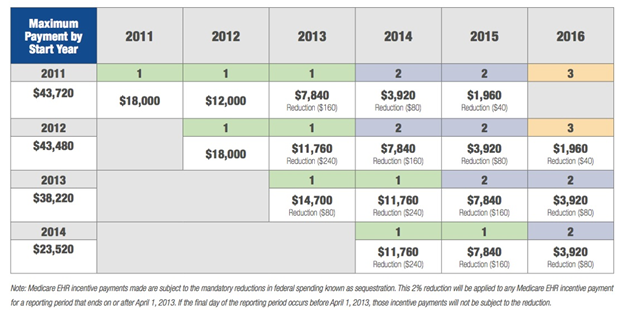
Providers who meet the requirements for Meaningful Use can receive an incentive payment equal to 75% of their total allowed Medicare Part B charges for the year up to the maximum thresholds listed in the table below. Keep in mind that these thresholds are maximums and are not a guarantee of what you will actually receive.
Previously, the maximum thresholds were $12,000, $8,000, and $4,000, respectively, but budget sequestration by the United States federal government in 2013 mandated reductions in federal spending including Medicare EHR incentive payments.
When will I get my incentive payment?
Per CMS, there will be a 4-6 week wait time from your successful attestation submission to the processing and distribution of your incentive payment if you have met the maximum threshold in total allowed Medicare Part B charges for the year.
If you have not met the maximum but demonstrated compliance with all the requirements and successfully submitted your attestation, you will still receive an incentive payment, but the wait time may be longer than 4-6 weeks.
If you reach the maximum threshold in total allowed charges for the calendar year before you attest, CMS will begin to process your incentive payment when you attest.
Please contact CMS directly for payment information and details: 888-734-6433
EHR Meaningful Use Program
How long will my reporting period be for 201?
All eligible providers participating will report for any consecutive 90 days to a full year, between 01/01/2016 - 12/31/2016.
What is the difference between attesting and reporting?
Reporting is gathering the required data and completing each of the objectives and sub-measures that are applicable to you throughout the reporting period each year.
Attesting is the process you go through to provide that data from your reporting period to CMS through the Attestation System website.
How do I know if participating in the program is worth it?
Meaningful Use reporting is not going away. CMS is already imposing payment penalties on providers who do not demonstrate meaningful use of a Certified EHR Technology (CEHRT) and planning the next stages of the program.
If you did not participate in the program and demonstrate meaningful use in 2014, you would have already received a 1% payment penalty on all Medicare reimbursements in 2016.
If you also chose not to participate in 2015, you will receive a 2% payment penalty on all Medicare reimbursements in 2017. CMS will increase this penalty by 1% for each year that you fail to demonstrate meaningful use until your penalty caps at 5% after 5 successive years of non-compliance.
Is there a minimum of Medicare patients that I must see or a minimum of Medicare charges that I must submit to participate?
Providers who have at least one Medicare patient may participate.
If I registered with CMS for the EHR Incentive Program last year, do I need to re-register this year?
No, you only need to register for the program once.
What is the EHR Certification number for ChiroTouch and how do I find it?
0014E5NX7RKU5RD
This number is located in the bottom left corner of your EHR Dashboard and on the EHR Training Page on MyChiroTouch.com under Attest.
EHR Reporting Period
Do I need to gather EHR information on all my patients or just on my Medicare patients?
You must collect EHR information for all your patients.
How long will my reporting period be in 2016?
If you began participating in the EHR Incentive Program prior to the current year, your reporting period will last the full calendar year. Your EHR dashboard should be set from 1/1/2016 to 12/31/2016 to monitor your compliance for the full year.
If 2016 is your first year participating in the EHR Incentive Program, your reporting period will last for 90 days.
How do I begin my reporting period?
You do not need to indicate to CMS or to ChiroTouch that you are beginning your reporting period. To begin your reporting period,
- Log in to ChiroTouch with provider credentials.
- Open the EHR Dashboard.
- Adjust your date range to reflect the start and end dates of your reporting period.
- You are responsible for compliance, as reflected on your EHR dashboard, throughout this period.
What Stage of EHR reporting I am in for my 2016 reporting period?
Stage 1: Any EP who started with the Meaningful Use program in 2015, or if 2016 is your first year, than you are considered to be a Stage 1 reporter.
Stage 2: Any EP who began participating prior to 2015 is considered a Stage 2 reporter.
CMS released Modified Stage 2 in October 2015. All providers will report to the Modified Stage 2 requirements, but those considered to be Stage 1 for 2016, will be able to exclude Radiology and Laboratory Orders under the CPOE Objective, however, in 2017 all providers will report for all Objectives no matter what Stage you are.
Please refer to the Modified Stage 2 Quick Reference Guide posted on the EHR Information page and CT Community.
I attested for a year or two, but then I skipped a year or two of reporting. What effect does this have on my Stage of reporting and my timeline?
Report based on the year you first demonstrated meaningful use and completed an attestation submission with CMS. Click here to view your reporting responsibilities based on the year you began participation in the EHR Incentive Program.
Modified Stage 2 Compliance
When will I begin Modified Stage 2 of EHR?
CMS released Modified Stage 2 in October 2015. All providers will report to the Modified Stage 2 requirements, but those considered to be Stage 1 for 2016, will be able to exclude Radiology and Laboratory Orders under the CPOE Objective, however, in 2017 all providers will report for all Objectives no matter what Stage you are.
Will there be a new Stage 2 intake form?
Starting in 2015, all providers will use the same EHR Intake Form, regardless of which year of reporting they are in. Click here to download a copy of the form or click EHR Intake Form in the Meaningful Use training manual’s table of contents.
Are there any new fees associated with Stage 2 of EHR?
The Stage 2 Service Pack is $295/year per provider with a one-time $100 setup fee for an ID verification. You need the Stage 2 Service Pack for 2016 if you meet any of the following criteria:
- You will do more than 100 radiology orders (in-house or via referral) during the reporting period. First and second year participants are excluded from this measure.
- You will do more than 100 laboratory orders (in-house or via referral) during the reporting period. First and second year participants are excluded from this measure.
- You will do more than 100 transitions of care or outbound referrals during the reporting period.
- If you don't meet any of those criteria, you do not need the Service Pack (i.e. MaxMD and LifePoint) because you will exclude the measures that require it.
- If you determine that you will need the Service Pack, you will need it in addition to the CTRx subscription that the provider already has. The pricing is $295/provider per year plus a one-time $100/provider set up fee.
- Every time you open the EHR Dashboard, a pop-up will prompt you to sign up for the package. You can sign up at any time this year as long as you allow yourself enough time to complete all of your Stage 2 Pack-related measures by December 31st, 2016.
How do I register a patient for the patient portal if the patient does not have an email address?
If a patient does not have an email on file, you can still register them for the portal. View Setting Up the Patient Portal for Your Patients.
Do I need to complete any of the Public Health Measures?
Click Here for the latest public health measure news Update
Visit the EHR Incentive Programs Website to Access the Centralized Repository for Public Health Agency and Clinical Data Registry Reporting
The Centers for Medicare & Medicaid Services (CMS) developed a Centralized Repository for public health agencies (PHA) and clinical data registries (CDR) to provide a centralized source of information for eligible professionals (EPs), eligible hospitals, and critical access hospitals (CAHs) looking for public health, clinical data, or specialized registry electronic reporting options.
To view an excel spreadsheet of the list of Data Repositories by state, provided by CMS, view this excel sheet. This sheet can also be found in the CMS page for Centralized Repository.
The Medicare and Medicaid EHR Incentive Programs include several public health measures that require EPs, eligible hospitals, and CAHs to engage with a PHA or CDR to submit electronic public health data. The repository will assist providers in finding entities that accept electronic public health data.
Please Note: CMS’ Centralized Repository is not the authoritative source of all public health reporting options currently available. For the Medicare or Medicaid EHR Incentive Program, the absence of an entry in the CMS Centralized Repository is not sufficient documentation for claiming an exclusion and should not prevent a provider from reporting to a registry. Providers must check with the jurisdictional public health agencies or specialty societies to which they belong and document that information to satisfy Medicare or Medicaid reporting.
For More Information
Review FAQ 13657 and FAQ 14117 for steps providers should take to determine if there is a specialized registry available, or if they can claim an exclusion. To learn more about what qualifies as a specialized registry, please review FAQ 13653.
Each state differs in which Public Health Measures (i.e. Objective 10A-C) they require chiropractors to complete for the Meaningful Use Program. Chiropractors can only claim exclusions for the measures that are not required in their jurisdiction, so it is important that you contact your state health department to find out what is required of you. We advise documenting any information you receive, and save that documentation as evidence in case of a future audit.
Find out more information about your Public Health reporting requirements and local contact by clicking on your state below.
Stage 2 Service Pack
Can I get a refund for the Direct Messaging and Lab Order services subscription?
If you need to cancel your subscription, you must submit a cancellation request via the MyChiroTouch.com Accounts page. Refunds are only granted for accidental sign-ups that you cancel within 30 days of your initial registration date, provided your direct account was never used. There are no refunds for those who purchase the service pack and then decide not to participate. The setup fee is non-refundable.
What is MaxMD?
MaxMD is a Health Information Service Provider (HISP). You must identify a provider at your practice to be your practice's HISP administrator before you sign up for the Services package.
A MaxMD Direct mdEmail® account provides a way to send secure e-mail communications containing health information directly to a trusted recipient over the internet in a HIPAA compliant manner.
Why do I have to undergo identity verification?
Verifying your identity as a provider is an important measure to protect patient health information. Direct messaging facilitates secure messaging between health care providers, so MaxMD must verify your identity as a health care provider before issuing your Direct mdEmail® account credentials.
Why do I need a MaxMD Direct mdEmail® account?
The reasons for Meaningful Use Stage 2 participants and for those concerned with achieving HIPAA compliance are the same! The MaxMD Direct mdEmail® account gives you a secure e-mail connection via the Direct protocol, which is compliant with both HIPAA and Meaningful Use Objective 5 requirements. Direct accounts are necessary to offer providers a secure, standards-based way for participants to send authenticated, encrypted health information directly to trusted recipients over the internet. CMS's Stage 2 Meaningful Use program emphasizes exchanging health information between providers and settings of care, but this is important regardless of whether or not you are participating in the program.
What is Direct Messaging?
Direct Messaging has more robust security than traditional e-mail accounts. The Direct messaging protocol is specifically designed for the exchange of patient health information across different EHR networks. Traditional means of communication can be compromised by unauthorized users, but Direct Messaging allows credentialed health care providers to securely share patient information electronically with outside providers.
Watch this video to learn more about how to use your MaxMD Direct Messaging service:
What is a HISP administrator, and what are the responsibilities associated with this role?
The HISP administrator should be the primary practicing provider (usually the practice owner).
The HISP administrator is responsible to ensure that all staff who have access to the system use it responsibly.
The provider who will be your practice's HISP administrator must be the first person at your practice to register for the EHR Stage 2 Services package.
The HISP administrator must also complete identity verification via a recorded video conference.
Why do I need to sign up for Lifepoint?
To comply with Objective 3 – CPOE Laboratory Orders and Radiology Orders, you must be able to complete and manage lab and radiology orders within your Certified EHR software. The Lifepoint service enables your compliance by allowing you to complete and track these orders, upload lab test results, and import lab imaging results for radiology orders.
If you are not participating in Meaningful Use, you can still utilize this service to complete and manage lab and radiology orders within ChiroTouch.