Verify FAQ
Verify Setup
 How do I sign up for Verify?
- Navigate a web browser to www.mychirotouch.com and log in.
- Click the Services at the top of the page.
- Click the Verify icon.
- Answer the short enrollment questionnaire and click Submit Request.
- The Services page will display a Welcome screen. You will immediately receive an email congratulating you on signing up for Verify.
- After the CT ProClear team has enabled Verify in your system, you will receive an enrollment confirmation email. (this will take about 7-10 business days).
Do I have to use CT ProClear in order to use the Verify service? I use a different clearinghouse for submitting claims—can I also use Verify to check my patients' eligibility?
Anyone can use Verify to check eligibility; you do not have to be signed up for EDI services through CTProClear.
Verify is a service offered by CTProClear, which is powered by Trizetto Provider Solutions (formerly Gateway EDI). We will setup an account with them for you; however, this will not affect how you submit your claims.
Why is my invoice emailed by CTProClear? I signed up for the Verify service, not EDI services with CT ProClear!
The Verify service is provided by CT ProClear. Thus CT ProClear handles billing for the Verify service.
Do I have to have a group National Provider Identifier (NPI) to enroll in Verify?
No. The enrollment questionnaire will ask you to enter a Group NPI value; however, if you do not have one, enter 0000000000.
How long does it take to get set up with Verify?
On average, the enrollment process takes approximately 7 business days to complete.
Some individual payers require additional enrollment information and thus take longer for approval. You can check benefits for all your other payers while you are waiting for approval from these payers.
Why does the enrollment questionnaire ask about some but not all payers? Does this mean I can only check benefits for those payers listed in the enrollment questionnaire?
Eligibility is available for all supported payers. However, because some payers require additional enrollment information for eligibility verification, they are included in the enrollment questionnaire to facilitate a timely enrollment process.
How long does the enrollment process take for those payers who require additional enrollment?
Enrollment times vary by payer. Enrollment for some payers can take up to 3 weeks. However, enrollment for most payers is immediate.
Do I have to wait for three weeks to use Verify?
No. You can begin using Verify as soon as you receive your enrollment confirmation email. You can check benefits under most payers immediately.
You will not be able to check benefits for a payer that requires additional enrollment information for eligibility notification until that payer's enrollment process is complete. You will receive an approval notification when enrollment for one of these payers is complete.
How will I know when Verify is ready to use?
You will receive an enrollment confirmation email from ChiroTouch with a link to the Verify Online Help Topic and your SFTP password. You will need this SFTP pass word to configure Verify in your ChiroTouch software.
What is an SFTP password? What do I do if I lose or can't find my SFTP password?
SFTP stands for File Transfer Protocol. Trizetto Provider Solutions (which powers CTProClear, which offers the Verify service) uses a secure SFTP to transfer verification information. Trizetto assigns you a unique SFTP password.
Your enrollment confirmation email contains your SFTP password.
If you misplace or can't find your SFTP Password, contact CTProClear at 619-546-4703.
Is my SFTP Password the same as my password to access my Gateway EDI site?
No. Your SFTP password is assigned by Gateway EDI (now Trizetto Provider Solutions).
Your enrollment confirmation email contains your SFTP password.
If you misplace or can't find your SFTP Password, contact CTProClear at 619-546-4703.
What is my Site ID? Where can I find it?
Your Site ID is your unique identifier assigned by Gateway EDI (now Trizetto Provider Solutions).
If you need assistance with your Site ID, contact CTProClear at 619-546-4703.
I need help setting up Verify. What should I do?
First, read our Verify instructions and/or watch our helpful Verify training video.
If you are still having difficulty, please start a live chat session or call 619-528-0040 for additional assistance.
Verify Eligibility
I have many providers at my practice. Can I use the Verify service for just one of my providers and not the others?
No. If, for example, you have 3 providers in your office, you will need to enroll all 3 payers for online eligibility.
What if I am not an In-Network Provider—can I still verify benefit eligibility with that payer?
Payers are not required to provide information for out-of-network providers. Eligibility information provided is at the discretion of each payer.
What payers can I check benefits for?
We are adding payers to our database all the time. To view a current list of all supported payers, visit Gateway EDI's website.
What kind of information does Verify provide?
All information that the payers provide is passed on to you; Verify does not withhold any of this information.
Information is provided at the discretion of the payer. Thus, information will vary.
Usually, you will receive basic eligibility data including eligibility dates, co-pay amounts, and deductible information
Most payers do not provide specific diagnosis code or modality coverage information. To answer these detailed questions, call the payer directly.
How do I find a payer ID?
To look up a payer ID, visit Gateway EDI's website.
How do I know if a payer is supported for eligibility requests?
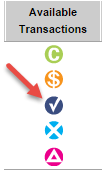
Payers that are supported for eligibility request are listed on Gateway EDI's website with a white check mark in a blue circle in the Available Transactions column.
NOTE: Note: Some payers have a different Payer ID for sending claims than for sending eligibility requests.
How current is the eligibility data that the Verify service returns?
The data is as current as the payer’s database. If the payer has not updated their database, this will affect the information that the Verify service returns.
How accurate is the data that the Verify service returns?
The data comes directly from the payers, and is as accurate as the payer’s database.
Note that verification of benefits is not a guarantee of payment.
How fast does the Verify service respond to requests?
Responses are real-time; it usually takes less than 10 seconds.
How can I track my eligibility usage?
At any time, you can access the Run Eligibilty Usage Report on Gateway EDI's website.
Search the report by date range or drill down by payer to see the payers you use the most.
Medicare Information
What is a Medicare Access Form?
Per The Centers for Medicare and Medicaid Services (CMS), providers must complete the Medicare Access Form in order to request eligibility information.
On the form, providers must confirm they are a valid Medicare Part A or Part B provider and hold a valid Medicare NPI.
The Medicare Access Form is valid for a period of one year and will subsequently need to be updated annually.
How do I complete or update my Medicare Access Form online?
- Navigate a web browser to https://mytools.gatewayedi.com/default.aspx and enter your login credentials.
- Select Check Patient Eligibility from the Manage Patients tab in the ribbon.
- Click Run Individual Eligibility Inquiry.
- Click the yellow Edit Payer List button on the left side of the window. The software will populate Medicare on the right side of the window.
- Select the Medicare check box.
- Click Save Payer List in the bottom right corner of the window.
- Click the Home tab and select Check Patient Eligibility from the Manage Patients tab in the ribbon.
- Click Run Individual Eligibility Inquiry.
- Click the green Medicare Access Form button.
- Complete the form and click Submit Signature.
I'm having trouble completing, submitting or updating my Medicare Access Form. Whom can I contact?
Please contact Gateway EDI at (800) 969-3666.